MTD for landlords: your 2026 compliance guide

If your total gross income from property and self-employment exceeds £50,000, Making Tax Digital for Income Tax (MTD for IT) applies to you from 6 April 2026. The first thing to do is check your qualifying income using your most recent Self Assessment return, then choose HMRC-compatible software before your start date.
Three actions to take now:
- Check whether your gross rental income and self-employment turnover combined exceed £50,000.
- Choose software that meets HMRC’s requirements before 6 April 2026.
- Sign up for MTD for Income Tax via GOV.UK, or appoint an agent to do so on your behalf.
MTD does not change how rental profits are calculated. As the Low Incomes Tax Reform Group (LITRG) makes clear, it changes the reporting process. You will send quarterly summaries of income and expenses to HMRC through your software, then confirm a final declaration once a year instead of filing a single annual Self Assessment return.
Key takeaways
MTD for Income Tax applies to landlords with qualifying income above £50,000 from 6 April 2026, requiring quarterly digital submissions through HMRC-compatible software and a final declaration by 31 January each year.
| Point | Details |
|---|---|
| Qualifying income threshold | Gross rental and self-employment income combined must exceed £50,000 to be in scope from April 2026. |
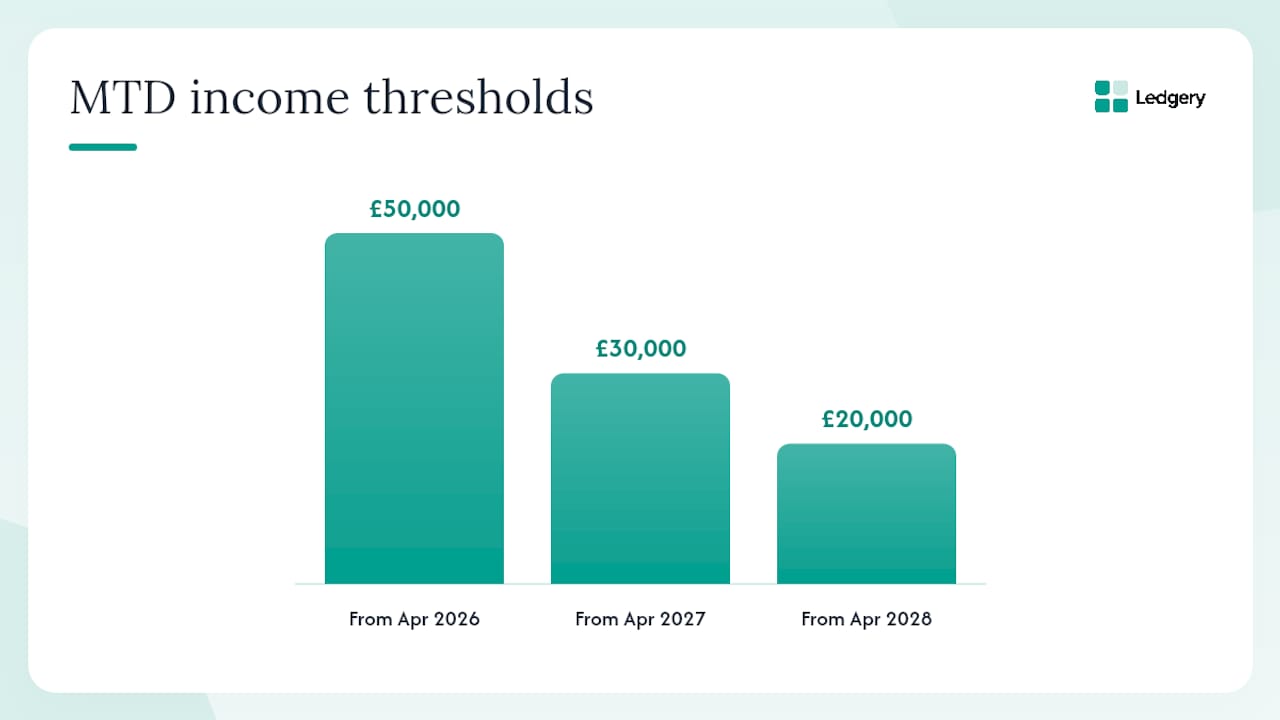
| Phased rollout dates | The threshold drops to £30,000 in April 2027 and £20,000 in April 2028. |
| Quarterly deadlines | Updates are due by the 7th of the month after each quarter ends; the final declaration is due 31 January. |
| Software is mandatory | HMRC requires compatible software that can store records, send quarterly updates, and submit the final declaration. |
| Ledgery for compliance | Ledgery automates receipt capture, quarterly summaries, and HMRC submission with a free first quarter to trial the process. |
Table of Contents
- Who needs to join MTD for Income Tax?
- How to work out your qualifying income
- When you must start and the key deadlines
- What a quarterly update actually contains
- Choosing MTD-compatible software
- How to sign up for MTD step by step
- What digital records you must keep and how to correct mistakes
- Penalties, enforcement and what to do if you miss a deadline
- How Ledgery automates a landlord’s quarterly workflow
- Why landlords should treat MTD as an opportunity
- Ledgery makes MTD compliance straightforward for landlords
- Sources
Who needs to join MTD for Income Tax?
From 6 April 2026, sole traders and landlords whose total qualifying income exceeds £50,000 must use MTD-compatible software. The rollout is phased: those with qualifying income above £30,000 follow from 6 April 2027, and those above £20,000 from 6 April 2028, as Crowe UK summarises.
Qualifying income is the combined gross figure from property and self-employment. HMRC uses your most recent tax return to determine whether you fall into scope, so the 2024/25 return is the relevant one for the April 2026 wave.
What counts as qualifying income:
- Gross rental receipts from UK residential or commercial property.
- Furnished holiday let income (where it still applies under current rules).
- Gross turnover from self-employment as a sole trader.
- Overseas property income reported on a UK Self Assessment return.
What does not count:
- PAYE employment income.
- Pension income.
- Dividend income.
- Savings interest.
- Partnership income (your share of partnership profits is excluded).
- Income from a limited company.
Joint ownership adds a layer of complexity. If you own a property jointly, HMRC allows certain easements, including reporting only your share of gross income rather than the full rental figure. The LITRG guidance on joint-ownership easements is worth reading carefully before you set up your software. Non-resident landlords subject to the Non-Resident Landlord Scheme still need to check whether their UK property income, combined with any self-employment income, crosses the threshold.
HMRC does not automatically enrol you. You must sign up separately, even if you are already registered for Self Assessment.
How to work out your qualifying income
Qualifying income is always the gross figure, before deducting any expenses. This catches out landlords who assume their net rental profit is what HMRC measures.
Step-by-step method:
- Open your most recent Self Assessment return (SA100 and supplementary pages).
- Find the gross property income figure from the UK Property pages (SA105), box 20 for furnished lettings or box 4 for other property.
- Find the gross turnover figure from the Self-Employment pages (SA103), box 9.
- Add the two figures together.
- If the total exceeds £50,000, you are in scope for the April 2026 wave.
The GOV.UK guidance on qualifying income for MTD lists each income type and the relevant return boxes in detail.
Worked example:
This landlord is in scope from 6 April 2026. The rental expenses (mortgage interest, repairs, letting agent fees) and business costs are irrelevant for the threshold test. Only the gross receipts count.
Pro Tip: If your qualifying income sits close to £50,000, check the figure for the previous two years as well. HMRC uses the most recent return, but if income fluctuates around the threshold, you may move in and out of scope year to year. Build a simple spreadsheet tracking gross receipts by source so you can assess scope quickly each April.
When you must start and the key deadlines
The phased rollout gives landlords time to prepare, but the dates are firm. Crowe UK’s summary sets out the three waves clearly:
- 6 April 2026: qualifying income above £50,000.
- 6 April 2027: qualifying income above £30,000.
- 6 April 2028: qualifying income above £20,000.
HMRC will write to taxpayers it identifies as being in scope, using the most recent tax return on file. Do not wait for that letter. If your figures put you above the threshold, begin preparing software and records now.
Quarterly update periods and submission deadlines:
The final declaration for the tax year is due by 31 January following the end of the tax year, the same date as the Self Assessment payment on account. For the 2026/27 tax year, that means 31 January 2028.
HMRC has confirmed that a grace period applies to quarterly penalties for the first wave (2026/27), meaning late quarterly submissions in that first year will not automatically attract a financial penalty. The penalties guidance on GOV.UK sets out the full framework and any transitional relief in detail. The final declaration deadline carries no such grace, so missing 31 January still results in the standard late-filing penalty.
What a quarterly update actually contains
A quarterly update is not a tax return. It is a summary of gross income and allowable expenses for the three-month period, sent through your MTD software directly to HMRC. No individual receipts are transmitted; HMRC receives only the summary totals. You keep the itemised records in your software.
Fields typically required in a quarterly update:
- Total gross property income for the period.
- Total allowable expenses by category (repairs, insurance, letting agent fees, and so on).
- Total gross self-employment income for the period (if applicable).
- Total allowable business expenses by category.
The GOV.UK guidance on using MTD for Income Tax confirms the ongoing obligations after sign-up, including the requirement to keep digital records and send updates within the deadlines above.
Quarterly updates are estimates. They do not trigger a tax charge on their own. At the end of the year, you complete a final declaration through your software. That is where you add any other income sources (savings interest, dividends, employment income), claim reliefs, and confirm the figures are correct. HMRC then calculates the tax due, and you pay by 31 January.
A simple quarterly workflow:
- Download or import your bank statements and letting agent reports into your software.
- Categorise income and expenses, using AI receipt scanning where available to speed up the process.
- Review the quarterly summary your software generates.
- Submit the update through your software before the 7th of the relevant month.
- Check that HMRC has accepted the submission (your software should confirm this).
Choosing MTD-compatible software
HMRC does not provide its own MTD software. You must choose a commercial product from the HMRC-recognised software list. As GOV.UK states, compatible software must be able to create, store and correct digital records, send quarterly updates, and submit the final declaration.
You cannot use two different products for the same submission type. One tool must handle property quarterly updates end to end.
Mandatory capabilities to check:
- Creates and stores digital records of income and expenses.
- Allows corrections to previously submitted quarterly updates.
- Sends quarterly updates directly to HMRC.
- Supports final declaration submission.
- Authenticates securely with HMRC via Government Gateway or the newer HMRC identity service.
Practical selection criteria:
- Automated bank feeds to reduce manual data entry.
- AI-powered receipt scanning to capture expenses from photos.
- Multi-property support if you have more than one rental.
- Joint-ownership easement options for shared properties.
- Agent access so your accountant can review or submit on your behalf.
- Deadline alerts so quarterly submission dates are not missed.
- Data export in a standard format so you are not locked in.
Pro Tip: Run the first quarter as a parallel exercise before your mandatory start date. Set up your software, import three months of real data, and go through the submission process without actually filing. This reveals any gaps in your record-keeping before they become a compliance problem.
How to sign up for MTD step by step
Being registered for Self Assessment does not register you for MTD for Income Tax. Sign-up is a separate step and requires recent tax-return history on file with HMRC.
Individual sign-up sequence:
- Confirm you are registered for Self Assessment and have filed at least one return.
- Choose your MTD-compatible software and set it up with your income sources.
- Go to GOV.UK and sign up for Making Tax Digital for Income Tax using your Government Gateway credentials.
- Authorise your software to connect to HMRC during the sign-up process.
- Set your quarterly update periods within the software (standard periods align with the tax year).
- Note your first submission deadline and set a reminder.
Appointing an agent:
If you use an accountant or tax adviser, they can act on your behalf once you authorise them. The agent must be registered with HMRC’s agent services account. You grant authorisation through your own Government Gateway account. Once authorised, the agent can submit quarterly updates and the final declaration using their own MTD software.
Data to have ready before you sign up:
- Your Unique Taxpayer Reference (UTR).
- National Insurance number.
- The date you started receiving property income.
- Your most recent Self Assessment return figures.
- Government Gateway user ID and password.
What digital records you must keep and how to correct mistakes
MTD requires you to hold records digitally, not just submit digitally. Paper receipts alone are not sufficient once you are in scope. You must capture the information from them into your software.
Records you must keep digitally:
- Rental income receipts and bank statements showing rental payments received.
- Letting agent statements and management reports.
- Invoices and receipts for allowable expenses (repairs, insurance, professional fees).
- Records of capital expenditure, even where it is not immediately deductible.
- Any records relating to furnished holiday let income if applicable.
HMRC generally requires records to be kept for at least five years after the 31 January submission deadline for the relevant tax year. For the 2026/27 tax year, that means retaining records until at least 31 January 2033.
If you spot an error in a submitted quarterly update, you can correct it by submitting a revised update for the same period through your software. The revised figures replace the earlier ones. You do not need to contact HMRC separately for a correction to a quarterly update. Errors discovered after the final declaration has been submitted require an amendment through your software or, in some cases, contact with HMRC directly.
The LITRG guidance notes that consolidated expenses are permitted for smaller portfolios in certain circumstances, which simplifies record-keeping. Check whether your software supports this option if your property income is relatively straightforward.
Letting agent statements are a practical starting point. Most agents provide monthly or quarterly statements showing rent received and fees deducted. These feed directly into your software as the income and expense records for that property, reducing the amount of manual entry required.

Penalties, enforcement and what to do if you miss a deadline
HMRC’s penalties framework for MTD for Income Tax applies to late or missing quarterly updates and to late final declarations. The framework uses a points-based system for late submissions: each missed deadline adds a point, and once a threshold is reached, a financial penalty applies.
For the first wave (2026/27 tax year), HMRC has confirmed transitional relief on quarterly submission penalties. This means points may not convert to financial penalties during the first year, giving landlords time to adjust. The late payment penalty and interest regime for unpaid tax is unchanged.
Immediate actions if you miss a deadline:
- Submit the overdue quarterly update as soon as possible, even if it is late.
- Check your penalty points balance through your software or HMRC online account.
- Contact HMRC if you believe you have a reasonable excuse (illness, bereavement, or a software failure outside your control).
- Appoint an agent urgently if you are struggling to manage submissions alone.
Exemptions and reasonable excuses:
Landlords who cannot use digital tools due to age, disability, or remoteness can apply for a digitally excluded exemption through HMRC. A reasonable excuse defence is available where a genuine, unforeseen event prevented compliance. HMRC assesses these on a case-by-case basis.
If you think you may qualify for an exemption, apply before your mandatory start date rather than after a penalty has been issued.
How Ledgery automates a landlord’s quarterly workflow
A practical MTD workflow for a sole-trader landlord using Ledgery looks like this:
From receipt to HMRC submission:
- Bank feed import: connect your rental bank account so income and expense transactions are pulled in automatically each month.
- AI receipt scanning: photograph paper receipts (a plumber’s invoice, an insurance renewal) and Ledgery extracts the relevant figures and categorises them.
- Review and categorise: spend a few minutes each month confirming categories and flagging anything unusual.
- Quarterly summary: at the end of each quarter, Ledgery compiles the gross income and expense totals into the format HMRC requires.
- Submit: send the quarterly update directly to HMRC through Ledgery and receive confirmation of acceptance.
For a landlord with two or three properties and modest self-employment income, this process typically takes under an hour per quarter once the initial setup is complete. The bulk of the time saving comes from automated bank feeds and receipt scanning, which remove the need to re-enter data manually.
Onboarding checklist for your first quarter:
- Connect your rental bank account(s) to Ledgery.
- Upload or photograph any receipts from the current quarter.
- Enter the start date for your property income.
- Review the income and expense summary before submitting.
- Set deadline alerts for the remaining quarters of the year.
Ledgery’s deadline alerts notify you before each quarterly submission date, reducing the risk of a missed filing. The first quarter is free, so you can test the full workflow before committing to a subscription.
Pro Tip: Use the free first quarter to reconcile your Ledgery records against your letting agent statements. If the figures match, your setup is correct. If they do not, identify the discrepancy before you submit, not after.
Why landlords should treat MTD as an opportunity
The instinct for many landlords is to view MTD as an administrative burden. That is understandable. Quarterly submissions on top of an annual return sounds like more work, not less.
The reality tends to be different once the process is running. Quarterly updates force a regular review of income and expenses, which means errors are caught within weeks rather than discovered eleven months later when preparing a Self Assessment return. Cashflow forecasting becomes more reliable because the numbers are current. And the year-end process is shorter, because most of the reconciliation work has already been done across the four quarters.
The first mandatory quarter is also the lowest-risk moment to refine your process. Transitional penalty relief applies for 2026/27, so a late or imperfect first submission is unlikely to result in a financial penalty. Use that window to test your software, check your records, and decide whether you want an agent involved.
MTD is a change to how you report, not to how your tax is calculated. The underlying rules for rental profits remain the same.
Ledgery makes MTD compliance straightforward for landlords
Ledgery is built for landlords and sole traders who need to meet MTD requirements without spending hours on tax admin. Instead of gathering receipts at year end, you photograph them as they arrive. Ledgery’s AI extracts the figures, categorises the expense, and adds it to your running quarterly total.
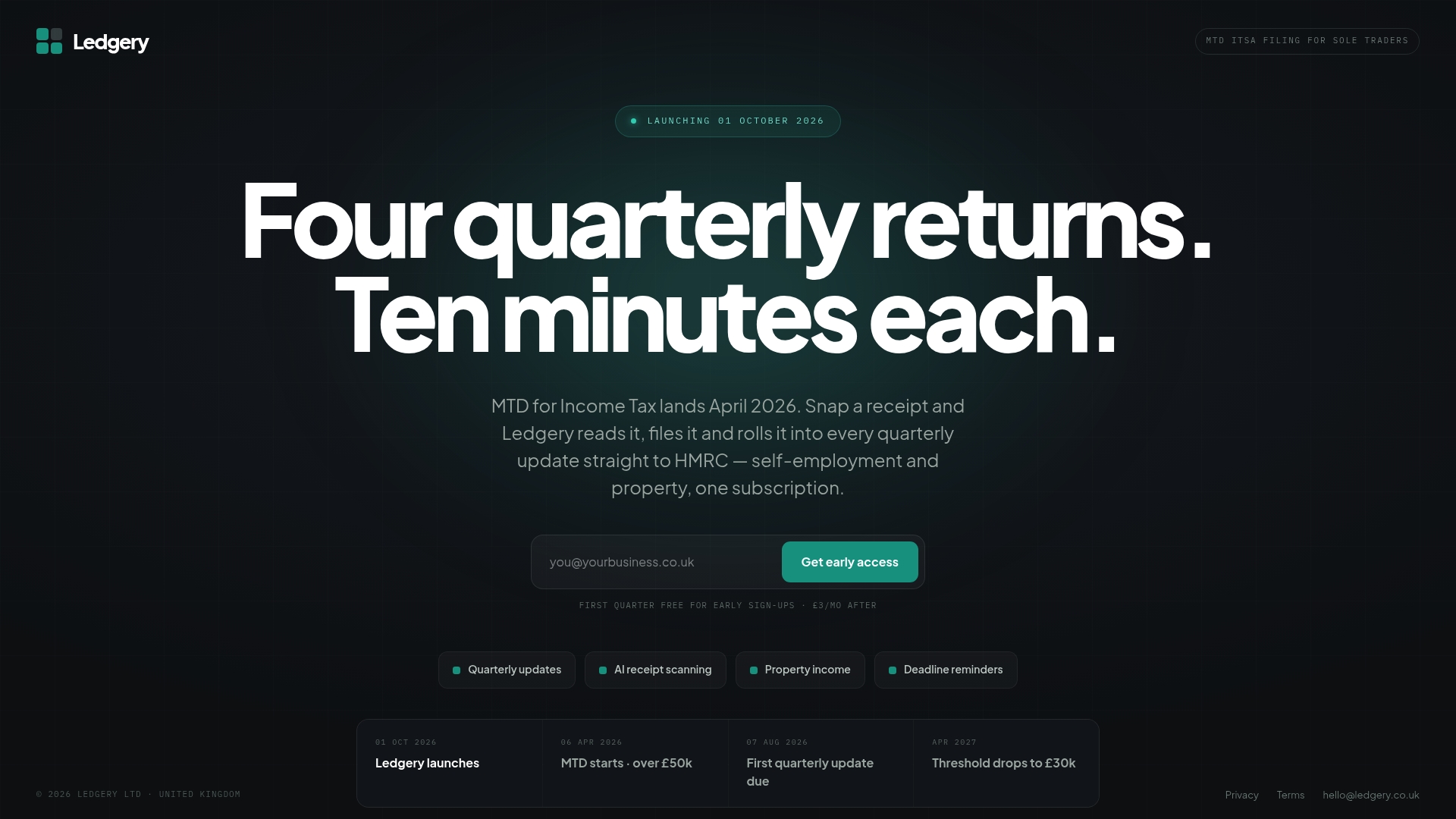
When a quarterly deadline approaches, Ledgery sends you an alert. When the quarter closes, your summary is ready to review and submit to HMRC in a few clicks. The platform stores your digital records securely, supports multiple income sources, and keeps everything in one place for the final declaration in January.
The first quarter is free. That gives you a full three months to run your rental income and expenses through Ledgery, submit a real quarterly update to HMRC, and confirm the process works for your portfolio before any subscription cost applies. Start your free quarter at Ledgery and have your MTD compliance in place well before the April 2026 deadline.
Sources
The rules for MTD for Income Tax are set by HMRC and published on GOV.UK. These pages are the definitive reference and are updated when guidance changes, so check them before making compliance decisions.
This article provides general information about MTD for Income Tax and is not a substitute for professional tax advice. Confirm current rules and your own position with HMRC or a qualified tax adviser.
Recommended
Self-employment and property income in one subscription, first quarter free. Join the early access list and we’ll email you once, when it opens.
Join early access