Ten Minutes a Week: Tag Tax Receipts by Category for UK Self Employed

Capture every receipt on the day you spend, tag it to the tax category it belongs to, store a legible digital copy in one central place, and review the lot for ten minutes each week. That four-step routine, backed by Ledgery’s automated scanning, is what keeps self-employed workers and small business owners out of the January scramble. HMRC accepts digital copies as valid records provided they stay accurate, complete and readable.
TL;DR:
- Capture receipts immediately using phone scanning, email filtering, or photographing thermal receipts to prevent data loss and ensure audit-readiness.
- File expenses by tax category at the moment of capture rather than by month, simplifying year-end reporting and avoiding late sorting.
- Use consistent naming conventions and tagging to enable quick search and accurate categorization when generating reports or during audits.
- Maintain two independent backups of digital records and test the restore process regularly to stay prepared for record-keeping or disputes.
- A system that automates receipt capture, tagging, and quarterly HMRC-ready export, such as Ledgery, reduces manual effort and keeps compliance simple.
Table of Contents
- Quick-start checklist: set this up in 10 to 30 minutes
- How should you capture receipts as they happen?
- How do you file receipts so tax time is easy?
- Which tools actually reduce the manual work?
- What does HMRC actually require, and how long should you keep records?
- How do you keep the system running all year?
- Why does Ledgery fit this exact system?
- What matters most, and what gets overrated
- A quicker route to compliant, quarterly-ready records
- Sources
Quick-start checklist: set this up in 10 to 30 minutes
You don’t need a perfect system on day one. You need one home for every receipt and a habit that keeps feeding it. Here’s the setup, in order.
- Pick one digital home. A single cloud folder, a bookkeeping app, or a receipt-capture tool. The exact choice matters less than the discipline of using only that one.
- Set your phone to scan and upload automatically. Most phone cameras now handle document scanning natively, and pairing that with an app that auto-uploads to your chosen home removes the “I’ll do it later” step that causes most receipts to vanish.
- Build an email filter. Create a rule that forwards anything from Amazon, your fuel card provider, or software subscriptions straight into a labelled folder or a dedicated forwarding address linked to your archive.
- Separate business and personal spending. Use a distinct card for business purchases, and tag recurring subscriptions the moment you sign up, not six months later when you’re guessing what a mystery charge was for.
- Triage your existing paper pile. Scan thermal till receipts today, because they fade fast. Anything that legally needs an original (certain VAT invoices, some insurance documents) goes into a labelled physical folder; everything else gets photographed and shredded.
Pro Tip: Do the paper triage in one sitting with a podcast on. It feels tedious in isolation, but batching it against something else you’d be doing anyway makes the backlog disappear in under an hour.
Once these five steps are live, new receipts start flowing into one searchable place without you thinking about it. That’s the entire point: a system that runs on autopilot beats a perfect filing method you only use twice a year.

How should you capture receipts as they happen?
Capture is where most receipt systems die, not filing. If you get the moment of purchase right, everything downstream becomes trivial.
Phone scanning. Use good lighting and let your app’s autocrop do the work rather than fighting a crooked photo. Set a consistent default filename pattern at the point of capture if your app allows it, and enable auto-upload so the image leaves your camera roll the second it’s taken. A photo sitting in your gallery for three weeks is a photo you’ll eventually lose.
Most phones now include built-in document scanning (iOS Notes, Android’s Files app, or a dedicated capture app), and connecting that scan-to-cloud pipeline to your one central home is a five-minute setup that pays for itself the first time you need to find a receipt from March.
Email receipts. These are the easiest wins in the entire system. Set filters or labels so anything from a known vendor forwards automatically into your archive folder or a dedicated ingestion email address. Automating this single channel handles a large share of recurring business costs with no manual effort, particularly for subscriptions and online purchases, leaving phone scanning to cover the physical, cash-based gaps.
Paper receipts. The rule here is simple: keep originals only when the law or your accountant specifically requires them, scan and shred everything else. Thermal receipts deserve urgency. The ink on till receipts is heat-printed rather than dyed, and it fades within months, sometimes to total illegibility. A receipt you photograph the same day is a receipt you can defend at audit. A receipt you photograph in three months might already be a blank strip of paper.
A durable system extracts the vendor, date and amount at the point of capture, rather than relying on you remembering which folder something landed in six months later. That’s what separates a searchable archive from a digital shoebox.
- Scan same day, especially thermal paper.
- Let autocrop and auto-upload do the manual work for you.
- Route email receipts through filters, not manual forwarding.
- Keep only the paper the law genuinely requires.
Pro Tip: If you’re a landlord, photograph the invoice next to a note of which property and which job it relates to. It takes two extra seconds and saves an afternoon of guesswork at year end.
How do you file receipts so tax time is easy?
Filing by tax category, not by month, is the single change that turns year-end from a reconstruction project into an export. Self-assessment forms ask for totals per expense type, so organising chronologically just means you’ll redo the sorting work later anyway.
Here’s a practical mapping to get you started, not an exhaustive list:
- Office costs — stationery, software subscriptions, printer supplies.
- Travel — fuel, train tickets, parking, mileage-related fuel receipts.
- Repairs and maintenance — for landlords, this splits further into repairs (deductible immediately) versus capital improvements (treated differently for tax purposes).
- Professional fees — accountant costs, legal advice, insurance premiums.
- Cost of goods or materials — anything bought specifically for resale or client work.
- Other — a genuine catch-all bucket for the odd receipt you’re not sure about, reviewed monthly so it never becomes a dumping ground.
For property owners specifically, allocating costs by property and by job at the moment of capture turns what would otherwise be hours of reconciliation into a short export. This is where category-first filing earns its keep most obviously, because a repair on one flat can’t be lumped in with a capital improvement on another without creating a mess later.
Naming conventions matter more than people expect. Use a consistent pattern: YYYY-MM-DD_vendor_amount, so a receipt from a builders’ merchant on 14 March 2026 for £84.50 becomes 2026-03-14_travisperkins_84.50. Pair that with a tag for the category (office, travel, repairs) and you can pull a full list of any expense type in seconds, sorted chronologically, without opening a single file.
When a receipt genuinely doesn’t fit an obvious category, don’t force it. Drop it in your “Other” bucket with a one-line note explaining what it was for, and clear that bucket during your monthly review rather than letting it grow into fifty unexplained items by December.
Which tools actually reduce the manual work?
Not every taxpayer needs the same setup. The right tool depends on how many receipts you handle each month and how comfortable you are trusting software to categorise things for you.
Broadly, the options fall into a handful of categories: phone scanner apps that do capture only, receipt-capture apps that also extract data, cloud storage paired with OCR (optical character recognition) for searchability, full bookkeeping packages that combine receipts with invoicing and reporting, and inbox scanners that pull receipts straight from your email.
Comparative rankings of these approaches consistently put manual folder systems at the bottom and full automation at the top, with automated email capture plus phone-scan fallback for cash purchases coming closest to a near-zero manual workload. The gap between “shoebox” and “automated” isn’t marginal. It’s the difference between a Sunday evening spent typing numbers into a spreadsheet and a Sunday evening spent not thinking about tax at all.
Before choosing, run through a short checklist:
- Volume. Under ten receipts a week, a phone scanner and a disciplined folder might suffice. Above that, manual tagging becomes the bottleneck.
- HMRC exports and Making Tax Digital support. If you’re approaching the MTD income tax threshold, you’ll want software built to generate the quarterly updates HMRC now expects, not a generic filing cabinet.
- Accountant access. Can your accountant log in and pull category totals directly, or are you emailing them a spreadsheet every quarter?
- Budget. Free tools handle capture. Paid tools handle capture, categorisation, and compliance together.
Pro Tip: Before committing to any paid tool, test it for one full week against real receipts, not a demo dataset. See whether it correctly reads a crumpled fuel receipt and a PDF invoice equally well; that’s the real test of an OCR engine, not its marketing page.
Automation workflows that route email receipts through OCR straight into a tagged category cut manual entry to almost nothing for digital purchases, leaving you to handle only the physical, cash-based exceptions by hand.
What does HMRC actually require, and how long should you keep records?
HMRC’s rule is simpler than most people assume: there’s no mandated format. Paper, digital copies, or bookkeeping software are all acceptable, provided the records stay accurate, complete and readable. A blurry photo of a faded thermal receipt fails that standard even if the receipt technically exists somewhere.
Retention timelines depend on your situation:
- Minimum three years after the end of the tax year for most self-employed income and expense records.
- Six to seven years or longer if the records relate to an asset you’ve bought, sold, or claimed capital allowances on, since HMRC may need to see the original purchase history when you eventually dispose of it.
- Indefinitely, in practice, for anything tied to an ongoing enquiry or dispute, until it’s formally resolved.
A one-copy system is a fragile system. Keep two independent backups: your primary cloud archive plus a secondary export, whether that’s a second cloud provider, a local hard drive, or a periodic download to a spreadsheet. Test that you can actually restore from your backup every few months. A backup you’ve never opened is a backup you don’t actually have.
If receipts do go missing, HMRC’s expectation is that you reconstruct records where possible before resorting to estimates. Ask the supplier for a duplicate invoice, check your bank or card statements for the transaction date and amount, and if you must estimate, attach a contemporaneous note explaining your reasoning. A written explanation from the time, rather than a guess made months later during an enquiry, carries far more weight. If you’re chasing a supplier for a duplicate, it helps to know what a valid UK invoice must legally include, so you can spot whether what they send you actually meets the standard.
How do you keep the system running all year?
A system only works if maintaining it takes less effort than the problem it solves. Three routines, at three different intervals, keep this one alive.
- Weekly, ten minutes. Capture anything you missed, tag new receipts that landed without categories, and reconcile against any new bank transactions that don’t yet have a matching receipt. This single habit is the difference between a system that survives an enquiry and one that collapses under its own backlog.
- Monthly, thirty minutes. Check category totals for anything that looks off, chase down the handful of receipts you know are missing, and export a month summary if your accountant wants regular visibility rather than one annual dump.
- Year-end, an afternoon. Do a final reconciliation against your bank statements, export per-category totals ready for your return, and assemble an audit pack: a single folder or export containing every supporting receipt, organised by category, in case HMRC ever asks to see it.
Test your backup restore process at least once during the year, ideally right before year-end, so you’re not discovering a broken export the week your return is due.
Why does Ledgery fit this exact system?
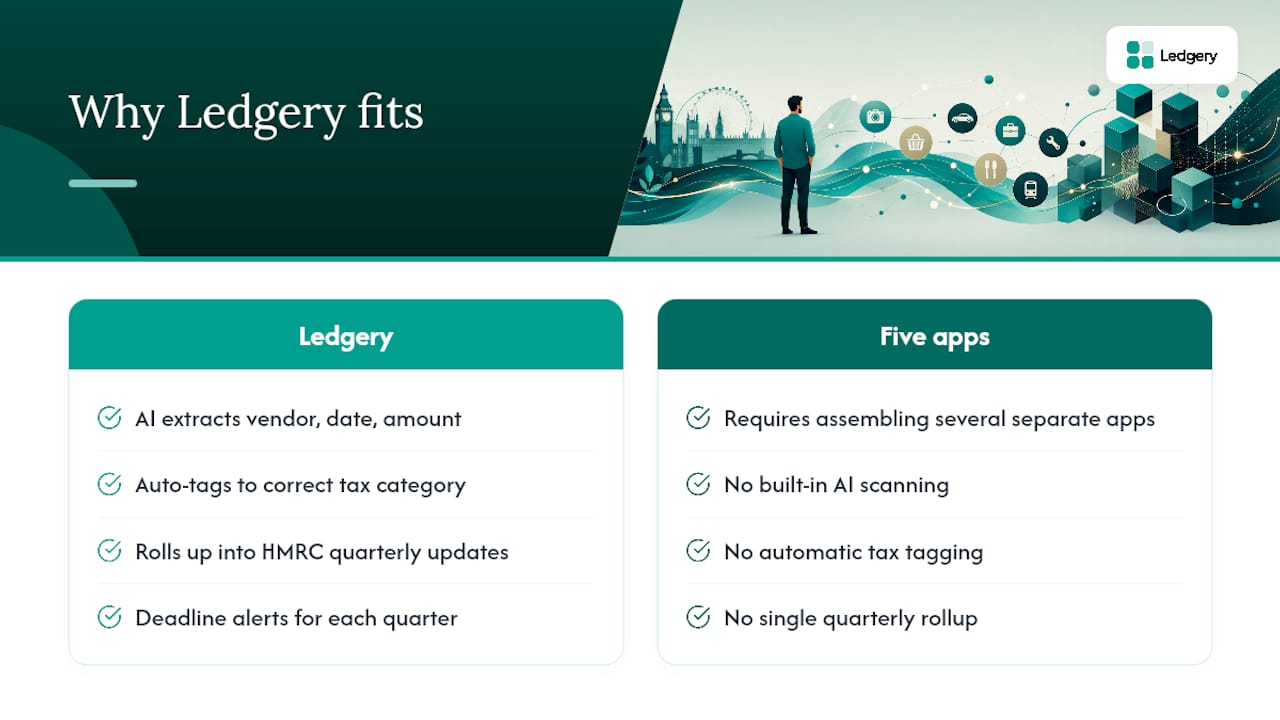
Ledgery builds the routine described above directly into the product rather than leaving you to assemble it from five separate apps. You photograph a receipt, and Ledgery’s AI scanning extracts the vendor, date and amount, then tags it to the correct tax category automatically. Those tagged entries roll up into quarterly updates formatted for HMRC submission, with deadline alerts so you’re never caught reconstructing three months of records the night before a deadline.
The subscription starts with a free first quarter, which matters if you’re testing whether an automated workflow actually fits how you work before committing money to it. For someone already juggling client work or property management, that trial period is long enough to run the weekly ten-minute habit for real and see whether it sticks.
This suits self-employed workers, landlords managing multiple properties, and small business owners who want a low-effort quarterly rhythm rather than a January panic. It’s particularly relevant for anyone approaching the Making Tax Digital income tax threshold, where quarterly digital updates stop being optional and start being a legal requirement.
What matters most, and what gets overrated
Most advice on this subject fixates on the wrong variable. People obsess over which app has the prettiest interface when the actual determinant of success is whether capture happens on the day of purchase, full stop. A receipt photographed three weeks late is already halfway to being lost, regardless of how good the software behind it is.
The conventional wisdom of “keep everything in a shoebox and sort it later” was never realistic, and chronological filing by month isn’t much better. It just delays the same sorting problem to a worse moment, when you’re rushed and the receipts have gone cold in your memory. Filing by tax category at the point of capture, the way property owners increasingly do when allocating costs per job, is the one structural change that actually removes work rather than deferring it.
If you take one thing from this: prioritise the weekly ten-minute review over any app decision. Get that habit right first. The tool you use to support it is a much smaller decision than most guides make it sound.
— Jason
A quicker route to compliant, quarterly-ready records
Everything in this article, capture on the day, tag by category, store one searchable copy, review weekly, is exactly what Ledgery automates instead of leaving you to manage across five separate habits and apps. You photograph the receipt; Ledgery does the tagging, the categorisation, and the quarterly HMRC-ready formatting that would otherwise eat your Sunday evenings.

It’s built specifically for self-employed workers and property owners who’d rather spend ten minutes a week than a full weekend every January, and it’s particularly suited to anyone nearing the £50,000 threshold where Making Tax Digital’s quarterly update requirements start to bite. The first quarter is free, so you can run the whole system for real before deciding whether it earns a place in your routine. Start your free first quarter with Ledgery and see whether your next tax deadline feels different.
Sources
Self-employment and property income in one subscription, first quarter free. Join the early access list and we’ll email you once, when it opens.
Join early access